Home
AbsoluteWord.com homepage
Products
Browse Palm OS and Pocket PC dictionary database, read descriptions, view screenshots and more
Download
Download dictionaries, RoadLingua viewer, AW Maker
Buy online
Purchase dictionaries for Palm and Pocket PC
Support
Customer support
F.A.Q.
Frequently asked questions
Partners
Partnership programs, internationalization, special offers
RoadLingua works with:
Palm OS powered handhelds:
- palmOne (Palm Inc.)
- Treo
- Sony
- Kyocera
- Acer
- TapeWave Zodiac
- Samsung
- other PalmOS handheld vendors
Pocket PC (Windows Mobile) powered handhelds:
- HP iPaq
- ASUS
- Acer
- Casio
- Compaq
- Dell
- Fujitsu
- Hitachi
- Samsung
- Toshiba
- NEC
- ViewSonic
- Rover
- other Pocket PC handheld vendors
|

English-Japanese Dictionary
Overview
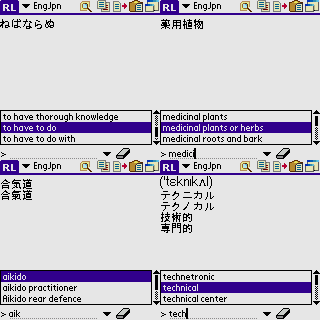
English-Japanese Dictionary. 78912 entries. This dictionary contains the most used words and it is perfect word set to fit in memory of 8MB devices, and devices with expansion cards. Also you need to have Japanese-enabled Palm OS, or Japanese localization system installed to display Japanese characters.
System Requirements
- Palm OS 4.0 or above
- RoadLingua (included with the dictionary distribution file)
- Japanese ROM, or Japanese localization (CJKOS)
|
How To Install The Dictionary (Palm OS)
For Palm OS EXE distributions (Windows only):
- Run the downloaded EXE file and follow the on-screen instructions
For ZIP distributions:
- Unzip the downloaded zip file with WinZip (or any other unzip utility) to any folder on your PC or Mac
- Open Palm Desktop application
- Click the Install button on the Desktop application's Launch Bar
- In the "Install Tool" dialog box, click the User Selector and select the correct user from the list.
- Click Add
- In the "Open" dialog box, select the
engjpn.pdband RoadLingua.prc file to install
- HotSync your handheld
|
|
Featured Pocket PC and Palm OS dictionaries:
Discounts
Other Products
International
|